Run Your Day
Smart Scheduling & Calendar
A resource-first calendar that scales from solo walker to full team — slot templates, pool-backed slots, and smart conflict detection.
Works on
- iPhone
- Android
- Web dashboard
In short
Wagify builds your schedule around resources — you and your team members. Clients pick from operator-defined slots per service; those slots can be tied to a specific person or to a pool that dispatches automatically at booking time. Pool-backed slots mean you create one slot template per time window and the system picks a free pool member per booking. Smart conflict detection keeps everything running without spreadsheet heroics.
In detail
Everything in Wagify scheduling starts with a resource. A resource is any person that does the work — you or a team member. When you first set up, your only resource is yourself. The whole system works exactly as it does today. When you bring on your first walker, that's a second resource.
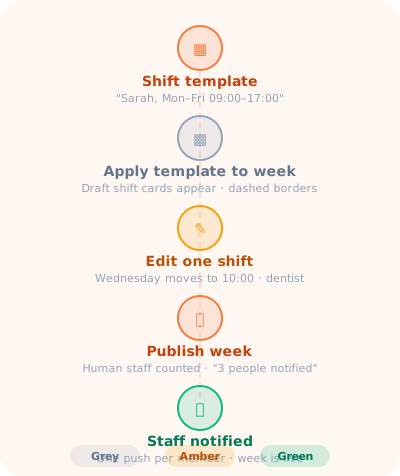
Each resource has one or more shift templates — recurring patterns like "Sarah works Monday–Friday 09:00–17:00". You materialise a week from the templates in one tap, edit any individual day that differs this week, then publish — and every affected team member gets a push notification at once. The rota now has an editable shift layer underneath the booking layer, a colour-coded Publish Week button (grey / amber / green), and a clean separation between drafts you're still working on and live shifts your team can see.
Clients don't pick arbitrary times — they pick from slot templates you've defined per service. Each slot template either pins to a specific resource ("Sarah, Tuesday 10:00, 1 dog") or points at a pool ("Walkers pool, Tuesday 10:00, 3 dogs"). Pool-backed slots let any scheduled pool member handle the booking, with the system picking one at booking time via the pool's dispatch policy. You create one slot template per time window; the system handles who takes each booking. When no pool member is available, a configurable no_pool_coverage policy decides what happens — warn the operator, allow with a flag, or block outright.
Smart conflict detection distinguishes between soft conflicts — "this is a tight turnaround but doable" — and hard blocks — "this resource is already fully booked" or "no pool member is scheduled at that time." Operators see soft conflicts and can override them with a reason (logged for reference). Clients only ever see hard blocks, shown simply as "not available" or "Full — join waitlist." No confusing error messages, no double bookings that slip through.
Questions about Scheduling
Can one slot be covered by different staff members?
Yes. A slot can use a coverage group, allowing an eligible available team member to be selected when a booking is made.
What happens when nobody can cover a slot?
The configured no-coverage rule can warn, flag, or block the booking.
Try Scheduling free for 14 days
Every feature, no card required, up to four users.