Grow Revenue
Automatic Waitlist
Full slots fill a waitlist. Cancellations auto-offer the spot. Revenue recovered automatically.
Works on
- iPhone
- Android
- Web dashboard
In short
When a slot is full, clients can join a waitlist with one tap. When a cancellation happens, the next person in line gets a push notification and a 4-hour window to claim the spot. Operator can redirect the offer to a different waiter — useful when pack dynamics matter.
In detail
A full slot used to mean a lost booking. Now it means a waitlist. When a client tries to book a slot that's already at capacity, they see a "Join Waitlist" option instead of a dead end. One tap and they're in the queue. No phone calls, no "I'll let you know if something comes up," no follow-up admin.
When a booking is cancelled, Wagify checks the waitlist for that slot immediately. The oldest waiter — first in, first offered — receives a push notification: "A spot has opened up for your Tuesday 9am walk. You have 4 hours to confirm." They tap the notification, confirm the booking, and the slot is filled. If they don't respond within the window, the offer passes to the next person in the queue automatically.
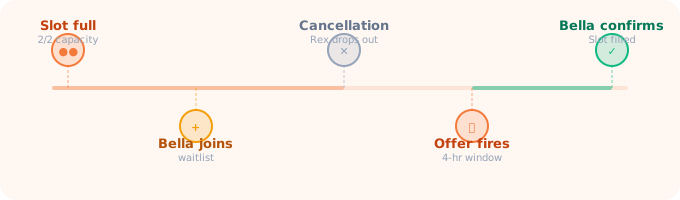
For businesses where pack dynamics matter, the automatic first-in-first-offered logic isn't always the right call. Maybe the first person on the list has a dog that doesn't get on with Rex, who's already in Tuesday's group. Operators can see the full waitlist for any slot and manually redirect the offer to a different waiter with a tap — "Bella gets this one, she's a better fit for this pack." The offer notification goes to Bella instead. The original first waiter stays on the list for future openings.
Waitlist behaviour is controlled by a single toggle in Business Rules — the auto-promote trigger can be on (spot opens, offer fires automatically) or off (operator is notified of the opening and chooses who to contact manually). Most businesses run it on. Operators who prefer more control run it off. Either way, the waitlist data is there and the offer system works the same.
Clients see their waitlist positions in the app. They can remove themselves any time. You see waitlist depth per slot on the rota and slot template views — a number badge on each slot showing how many people are queued. Popular slots with long waitlists are visible at a glance, which is useful information when deciding whether to add capacity.
Questions about Waitlist
What happens when a full slot opens?
A client on the waitlist can receive an offer after a cancellation. The current offer window described by the feature is four hours.
Can an operator choose who receives the offer?
Yes. The operator can redirect an offer to another waiting client when needed, including for package compatibility.
Try Waitlist free for 14 days
Every feature, no card required, up to four users.