Run Your Day
Coverage Groups & Smart Dispatch
One slot template, multiple staff. Wagify picks the right person at booking time — and shows you exactly who and why.
Works on
- iPhone
- Android
- Web dashboard
In short
A pool groups staff members so any one of them can fulfil a booking. Point a slot template at a pool and Wagify picks who handles each booking at booking time — first available, fair round-robin rotation, or the same person who walked this dog last time. The dispatch decision is transparent: the operator's booking detail shows "Auto-picked from [Pool Name] · round-robin · Maya". Pools can differ per service. Set once, adjust any time.
In detail
A coverage group is a named group of staff where any member can handle a booking. When a client books a pool-backed slot, Wagify picks who takes it according to the policy you've set for that pool. No manual allocation for every booking. No roster spreadsheet.
The big idea is pool-backed slot templates. Instead of creating one slot template per staff member (five walkers → five templates for 09:00 Tuesday), you create one slot template pointing at the Walkers pool. The system picks a free pool member at booking time. Clients see a single slot — the system handles who takes it.
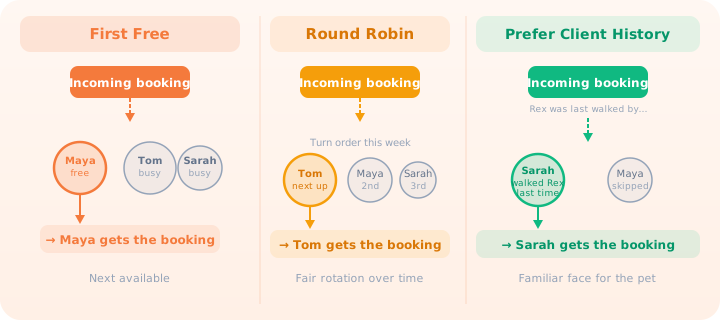
Three dispatch policies cover the most common needs. First Free picks the next available member in the pool — useful when speed matters and clients don't have a preference. Round Robin rotates through pool members in order, distributing bookings evenly over time so no one walker ends up with all the weekend slots. Prefer Client History picks the same member who last worked with that specific pet — ideal for dogs who settle better with a familiar face, or clients who've built a relationship with a particular groomer.
The dispatch decision is transparent on every booking. When a client's booking lands via pool dispatch, the operator sees "Auto-picked from Walkers · round-robin · Maya" on the booking detail. There's no mystery about which policy fired or who was chosen.
Dispatch is shift-aware. A pool member without a published shift covering the booking time is ineligible — no silently assigning someone who's off that day. Leave is respected too: members with an approved leave request are skipped for the duration. When no pool member is available at all, a configurable policy decides what happens — allow with a manual-assignment flag, warn the operator with override, or block outright.
Consider a "Walkers" pool with four team members and round-robin dispatch. Week one, Maya gets Monday's morning slots. Week two it's Tom. Week three, Sarah. The workload distributes automatically without micromanaging the rota. If someone is on leave, the remaining active members absorb the rotation. When they return, they rejoin without any manual reset.
Pools can differ per service. Your "Group Walks" service might use round-robin across all four walkers. Your "Reactive Dog Walks" service uses a separate pool with only your two most experienced handlers and prefer-client-history. Policy changes take effect for future bookings immediately.
Questions about Pools
How does Wagify choose someone from a coverage group?
The group can use first-free, round-robin, or prefer-client-history dispatch. The selected person and policy appear with the booking.
Are absent staff considered for assignment?
The dispatch checks shifts and approved leave, skipping people who are not eligible for the booking.
Try Pools free for 14 days
Every feature, no card required, up to four users.